

For small to medium projects run inside a Microsoft-centric organisation, Microsoft Project is usually the better fit. For large, schedule-driven enterprise programmes with multiple concurrent projects, Primavera P6 is the stronger choice. The decisive factor is scale and database architecture against ecosystem familiarity and ease of use. The sections below unpack the feature trade-offs that actually matter to schedulers.
TL;DR:
- Primavera P6 is better suited for large-scale, multi-project management due to its central database architecture and multi-user collaboration capabilities.
- Microsoft Project works best for small to medium projects within Microsoft-centric environments, offering easier learning curves and seamless integration with Office tools.
- Data sharing between tools is limited, with P6 using proprietary formats like XER and XML for cross-platform exchange, which can lead to information loss.
- Extensive project management skills and IT support are required to maximize P6’s enterprise features, while MS Project is more accessible for smaller teams with existing Microsoft 365 familiarity.
- Critical path analysis is more advanced in Primavera P6, especially for complex multi-path or cross-project dependencies, versus simpler single-path views in Microsoft Project.
Table of Contents
- What is Microsoft Project in 2026?
- What is Primavera P6 and why enterprises standardise on it?
- Architecture, deployment and multi-user collaboration
- Scheduling engine and critical path handling
- Resource, cost control and earned value across projects
- Baselines, import and export formats, and interoperability
- Reporting, dashboards and integrations
- Usability, learning curve and licensing cost considerations
- Use cases and a practical decision guide for schedulers
- Training and adoption: reducing rollout risk
- Practitioner perspective: capability versus adoptability
- How Oxford Centre training supports your scheduling tool adoption
- FAQ
- Sources
What is Microsoft Project in 2026?
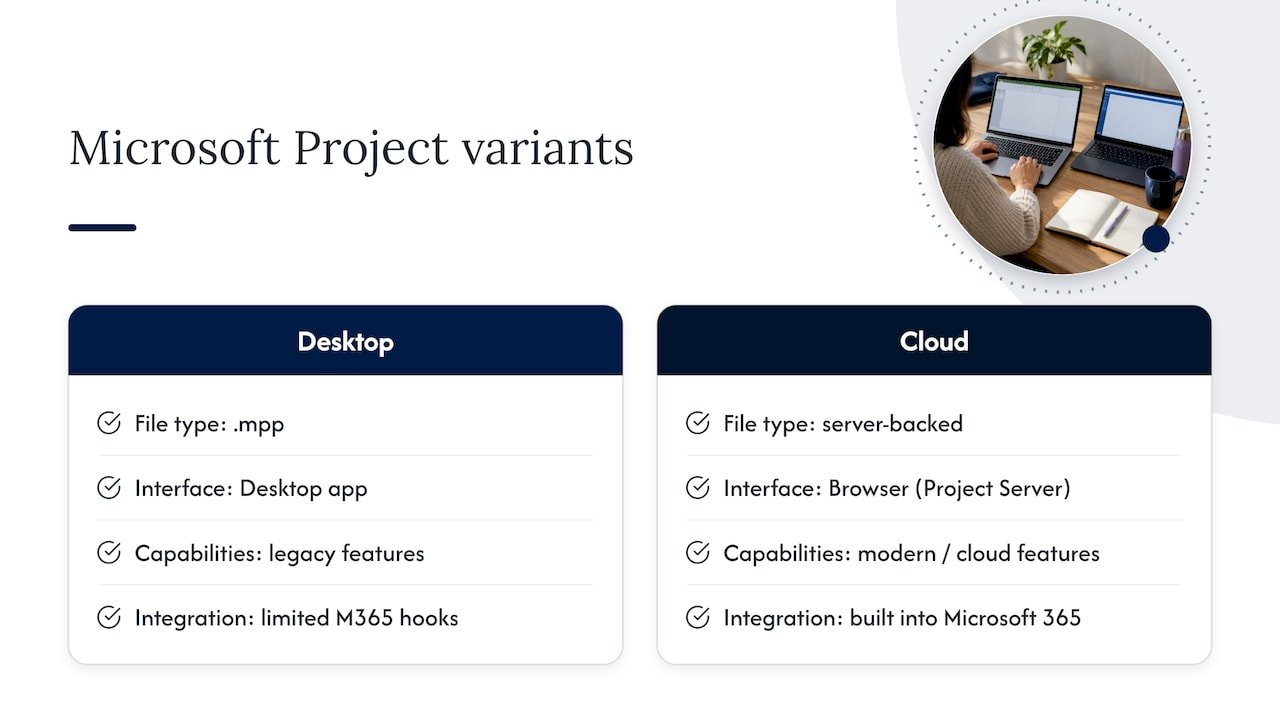
“MS Project” no longer means one product. The legacy desktop application, still sold as a file-based tool working with .mpp files, sits alongside Project Online and Project for the web, which run through Project Server and a browser interface. Analyst comparisons note that this split matters because capability and integration differ substantially between the legacy desktop workflow and the newer cloud subscription offerings, so choosing “Microsoft Project” means first choosing which variant.
Where Microsoft Project earns its place is the surrounding ecosystem. Teams already working in Microsoft 365 get native hooks into Teams, SharePoint and Power BI, and the Microsoft Project product page positions the tool explicitly as part of that suite rather than a standalone scheduler. That makes it a natural fit for IT, marketing and mid-size construction teams that need solid scheduling without a dedicated database administrator on staff.
What is Primavera P6 and why enterprises standardise on it?
Primavera P6 ships in several forms: P6 Professional for desktop-level scheduling, P6 EPPM for enterprise portfolio management, and a Cloud variant for hosted deployment. All three share the same underlying logic, but Oracle’s P6 Professional user guide explains that P6 Professional can connect either to a standalone database or to a full EPPM database, unlocking enterprise features such as the Enterprise Project Structure, Organizational Breakdown Structure and cross-project reporting.
That central database model, built on SQL or Oracle rather than individual files, is why construction, oil and gas, and civil engineering programmes with dozens of concurrent projects tend to standardise on P6. Multiple schedulers can work against the same dataset at once, which a file-based tool cannot offer without additional server infrastructure.
Architecture, deployment and multi-user collaboration
The two tools start from fundamentally different premises. Microsoft Project’s desktop edition stores a schedule in a single .mpp file, which is simple to open and edit but awkward to share across a large team without extra infrastructure. Primavera P6 is built around a central SQL or Oracle database from the outset, and Oracle’s import/export documentation confirms that this native database support is what gives P6 its edge in large-scale data management compared with Microsoft’s file-based approach.
That architectural gap shapes how each tool handles real multi-user work:
- A standalone .mpp file supports one editor at a time without conflict, so genuine concurrent access requires Project Server or Project Online.
- P6 connected to an EPPM database allows multiple schedulers, cost controllers and PMO leads to work against the same programme simultaneously.
- Interchange between the two worlds relies on XER, XML or MPX files, each with its own limitations covered further on.
- Database-backed deployments bring their own overhead: backups, user permissions and typically a database administrator or IT owner.
For a single project team on Microsoft 365, the desktop file model is fine. For an owner running fifteen interlinked programmes, someone needs to own the database, whichever platform is chosen.
Scheduling engine and critical path handling
Both tools implement the critical path method, but they expose it differently. Microsoft’s own support documentation describes how Project calculates and displays a critical path by default, which works well for a single, relatively linear schedule. Primavera P6 was built with multi-project, multi-path analysis in mind from the start, and experienced schedulers often turn to it specifically when a programme has several legitimate critical paths running through different work fronts at once.
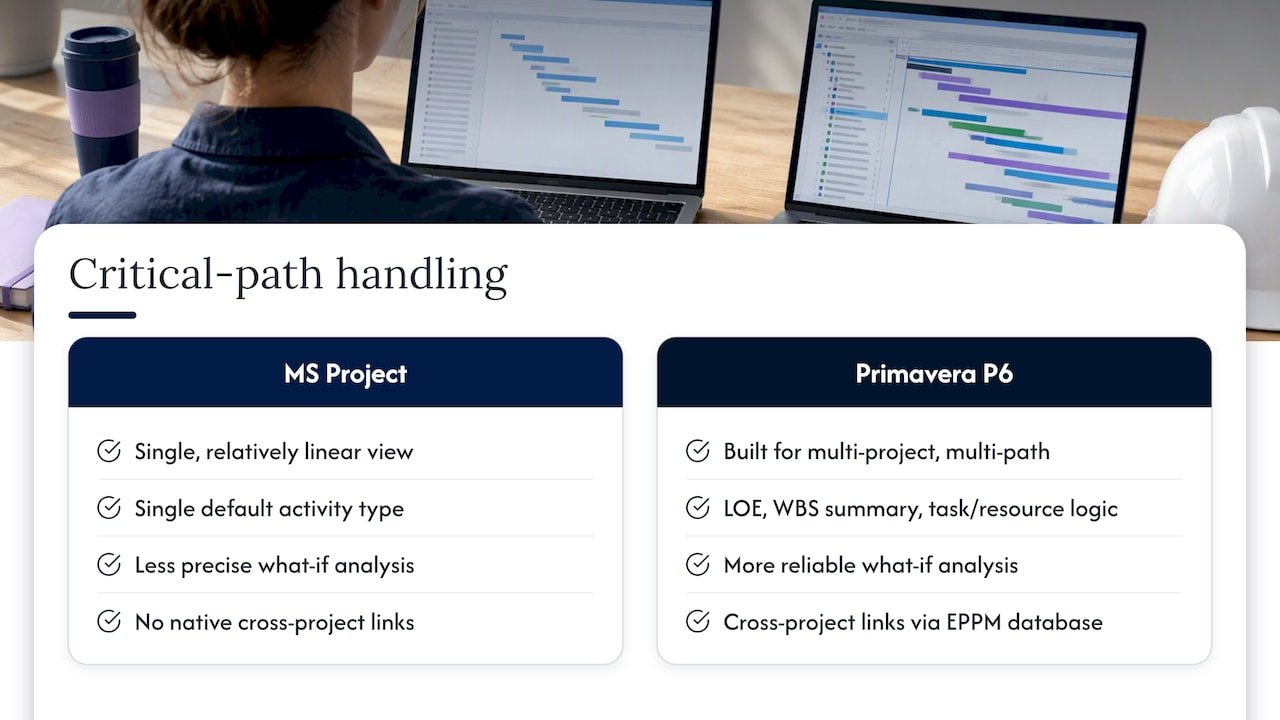
Activity types matter here too. P6 offers level-of-effort activities, WBS summary activities and task-dependent or resource-dependent logic that lets a scheduler model work more precisely than a single default task type allows. That precision pays off in what-if analysis: reordering logic, testing a compressed sequence or running a resource-constrained scenario is more reliable when the activity types themselves carry the right behaviour.
Mega-projects add a further requirement: cross-project dependencies. A P6 database connected through EPPM can link activities across separate projects within the same EPS, something a standalone .mpp file cannot do without manual workarounds. For organisations running a handful of unrelated projects, Microsoft Project’s simpler single-path view is usually all that is needed.
Pro Tip: Before committing to either tool for a multi-project portfolio, build a small test schedule with at least two interlinked critical paths and confirm the software surfaces both clearly, rather than collapsing them into one.
Resource, cost control and earned value across projects
Resource levelling and cost tracking both exist in Microsoft Project and Primavera P6, but they scale differently once more than a handful of projects share the same resource pool.
- Microsoft Project handles resource levelling and basic earned value fields well within a single schedule or a small set of linked plans.
- Primavera P6’s enterprise resource pool, available through an EPPM database, lets cost controllers roll up resource demand and earned value across dozens of concurrent projects.
- Cross-project rollups in P6 rely on the shared EPS and OBS structure, so a PMO needs that hierarchy configured correctly before the reporting becomes genuinely useful.
- Large Microsoft Project portfolios often need Project Online or a bespoke reporting layer to achieve a similar rollup view.
For a PMO managing a single capital programme, either tool’s native EVM fields will typically suffice. Once resource conflicts span many projects, the enterprise database model starts to earn its keep.
Baselines, import and export formats, and interoperability
Baseline management is where schedulers most often get caught out when moving between the two tools. Microsoft Learn documents a feature that lets Microsoft Project support multiple baselines per project, which strengthens audit trails and forecasting accuracy for PMO governance. Primavera P6 also supports multiple baselines, stored as snapshots within the project database.
The interchange problem sits in the file formats, not the baseline logic itself:
- XER is P6’s proprietary format and, according to Oracle’s import/export guide, it does not support moving baseline data between P6 databases.
- Oracle recommends P6 XML specifically when baseline information needs to travel between P6 databases.
- P6’s importing and exporting guide notes that MPX and Microsoft Project’s own XML format do not carry the complete set of P6 project, resource and role information, which means metadata can be lost in either direction.
The practical rule: keep baseline-bearing schedules inside one platform’s native format wherever possible, and treat any cross-platform export as a one-way snapshot rather than a round-trip.
Reporting, dashboards and integrations
Neither tool’s out-of-the-box reporting fully satisfies a modern PMO on its own. Microsoft Project’s native reports are serviceable for a single project, but organisations standardised on Microsoft 365 commonly pull schedule data into Power BI for executive dashboards, which the Microsoft product page frames as a natural extension of the same ecosystem. Primavera P6’s native reporting goes deeper for programme-level views but still often gets paired with external business intelligence tools for board-level summaries.
Integration effort depends heavily on what else sits in the technology stack:
- ERP integrations are common on both platforms, though P6’s database architecture tends to simplify large-scale data exchange.
- Construction and infrastructure teams frequently connect P6 to document management or BIM-adjacent platforms as part of design coordination, a workflow explained well in this guide to the Revit Project Browser.
- Microsoft Project users typically lean on existing Teams and SharePoint connections rather than adding separate integration layers.
When dashboard and executive reporting needs are the main driver, that alone can tip the decision towards whichever ecosystem already hosts the organisation’s other data.
Usability, learning curve and licensing cost considerations
Familiarity counts for a lot here. Third-party reviews on G2 consistently describe Primavera P6 as having a steeper learning curve than Microsoft Project, offset by greater native scheduling depth once mastered. Microsoft Project benefits from interface similarities to the rest of Office, which shortens onboarding for teams already comfortable with Excel and Outlook.
- Microsoft Project’s subscription tiers suit organisations that want predictable per-user costs tied to existing Microsoft licensing.
- Primavera P6’s enterprise deployments more often involve perpetual licensing or support contracts negotiated at the organisational level.
- Database-backed P6 deployments add IT overhead: server administration, backups and user access management.
- Dedicated scheduler roles are more common on P6 programmes, reflecting the tool’s depth and the complexity of enterprise configuration.
Neither licensing model is inherently cheaper; the real cost driver is how much specialist time the chosen platform demands to run well.
Use cases and a practical decision guide for schedulers
Choosing between the two comes down to five questions, best worked through in order:
- How large is the programme, and how many projects run concurrently?
- Do multiple schedulers need simultaneous access to the same data?
- What does the reporting and integration stack already look like?
- What in-house scheduling skills and IT support already exist?
- What governance and audit requirements apply to baselines and change control?
A mid-size IT rollout inside a Microsoft shop with one project manager typically points to Microsoft Project. A national infrastructure programme with five interlinked projects and a dedicated PMO typically points to Primavera P6. A hybrid organisation running both construction and corporate IT work often ends up using each tool where it fits best, rather than forcing one choice across the business.
| Scenario | Typical scale | Recommended tool |
|---|---|---|
| Single Microsoft-centric project team | Small to medium | Microsoft Project |
| Multi-project infrastructure programme | Large, enterprise | Primavera P6 |
| Mixed portfolio across sectors | Varies by project | Both, matched to project type |
Before committing, ask any vendor or internal IT team how baseline data moves between systems, what the real concurrent-user limit is, and who owns database administration once the schedule goes live.
Training and adoption: reducing rollout risk
Role-based training shortens the gap between buying a licence and running a reliable schedule. Schedulers, cost controllers and PMO leads each need a different depth of understanding: schedulers need activity logic and baseline discipline, controllers need resource and EVM reporting, and PMO leads need governance and rollup structures. Oxford Centre’s project management training covers these role-specific needs through on-site, online or blended delivery, which helps teams build the right skills before a tool migration goes live rather than fixing mistakes after.
Practitioner perspective: capability versus adoptability
The honest trade-off is this: P6 rewards investment with depth that Microsoft Project simply does not match at scale, but that depth is wasted on a team that never gets properly trained on it. Our practical advice is to pilot whichever tool fits your current scale on one live project, with baseline discipline built in from day one, before rolling it out across a portfolio.
— Sam
How Oxford Centre training supports your scheduling tool adoption
Switching scheduling platforms, or getting more value from the one you already run, usually comes down to how well your people understand it, not which logo is on the licence. We deliver project management training across on-site, online and blended formats, built around real scheduling, baseline, and reporting challenges rather than generic software tutorials.
Our courses focus on practical outcomes for schedulers, cost controllers, and PMO leads:
- Role-specific modules tailored to the typical responsibilities of each role.
- Flexible delivery options including on-site, online, or blended formats to accommodate team schedules.
- Qualifications led by instructors with industry experience.
If your team is weighing up a move between Microsoft Project and Primavera P6, or just wants to get more out of the platform already in use, visit our project management courses page to enquire about corporate bookings.
FAQ
Why is MS Project being discontinued?
Microsoft Project is not being discontinued as a brand, but the landscape has shifted towards cloud offerings. Microsoft now sells Project Online and Project for the web alongside the legacy desktop version, and analyst coverage notes that decision-makers must explicitly choose between the older desktop workflow and the newer subscription-based tools because their capabilities differ.
What are the key differences between Primavera P6 and MS Project?
The core difference is architecture: P6 runs on a central SQL or Oracle database built for large-scale, multi-user data management, while Microsoft Project’s desktop edition stores schedules in individual .mpp files. P6 also offers deeper multi-path critical path analysis and enterprise resource rollups, while Microsoft Project integrates more tightly with Teams, SharePoint and Power BI.
What is replacing Microsoft Project?
Nothing is replacing Microsoft Project outright. Microsoft continues to develop both the desktop application and its cloud counterparts, Project Online and Project for the web, and the product page positions these as the current offerings within the Microsoft 365 suite.
Does anyone still use Microsoft Project?
Yes, Microsoft Project remains widely used, particularly by organisations already standardised on Microsoft 365 that need solid scheduling without a dedicated database administrator. It is commonly the better fit for small to medium projects, while large, multi-project programmes more often standardise on Primavera P6.
Is Microsoft Project or Primavera P6 easier to learn?
Microsoft Project is generally easier to learn for teams already familiar with other Microsoft 365 applications, while reviews consistently describe Primavera P6 as having a steeper learning curve offset by greater scheduling depth. Structured, role-based training can shorten that learning curve considerably for schedulers moving to P6 for the first time.